

Wall mounted drop leaf desk solutions are transforming small home offices and multifunctional spaces, but their real-world benefits (and drawbacks) are often overlooked by first-time buyers. Here’s what you should actually expect from installation to daily use—plus practical, actionable advice you won’t find in most product descriptions.
Key Takeaways
- Proper installation and weight capacity awareness are critical to safety and durability.
- High-quality wall mounted drop leaf desks can handle up to 330 lb, but basic models are much less robust.
- Careful planning and the right anchoring hardware prevent common issues like wobbling or collapse.
- What Is a Wall Mounted Drop Leaf Desk?
- Step-by-Step Guide: Installing & Using Your Wall Mounted Drop Leaf Desk
- Advanced Analysis & Common Pitfalls
- Conclusion
- FAQ
What Is a Wall Mounted Drop Leaf Desk?
A wall mounted drop leaf desk is a fold-down platform that attaches directly to your wall, allowing you to create a compact, space-saving workspace that disappears when not in use. These desks are ideal for small rooms, studios, or multipurpose areas where every square foot counts. Whether you need a foldaway office workstation or a crafty kids’ homework zone, they adapt fast—if you plan ahead and install them properly. Space-starved apartment dwellers and remote workers increasingly turn to these desks for their mix of clutter reduction and flexibility.

Step-by-Step Guide: Installing & Using Your Wall Mounted Drop Leaf Desk
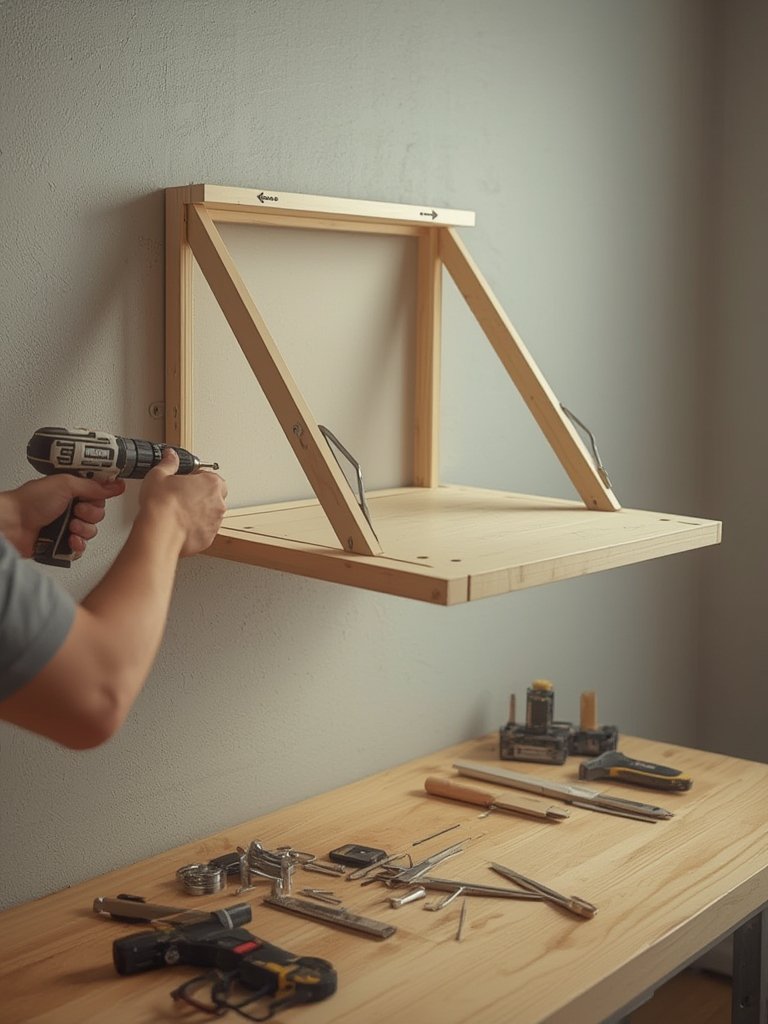
Mounting a drop leaf desk securely is not just about convenience—it’s about safety, especially if you want to use it for work, dining, or as part of a hybrid home office. Here’s how to do it right, avoiding frustration or disasters down the line:
- Unpack and Check Hardware: Before starting, confirm that all brackets, screws, and anchors are included. Review your desk’s manual for weight specs.
- Locate Studs or Solid Supports: Use a stud finder to identify reliable mount points. At minimum, the desk’s top mounts must connect to studs or masonry for support up to (or above) rated weight. For example, the UPLIFT Wall Mounted Standing Desk is UL certified and supports up to 175 lb.
- Mark and Pre-Drill Mounting Holes: Hold or tape the desk bracket against the wall to mark precise screw locations. Drill pilot holes—usually 3/16″ bits are suitable for wood studs or recommended anchor size for solid wall types.
- Install Top Screws into Studs (or Use toggle bolts): For drywall installs, use robust toggle bolts (at least six per some instructions) to prevent unexpected pull-out. Toggle bolts must be pushed through the drywall, rotated open, and tightened flush.
- Attach Desk and Secure Level: Mount the brackets, then hang the desk itself. Double-check with your level before fully tightening all screws. Insert shelf pins if your design includes shelves.
- Test Fold and Weight Capacity: Gently fold the desk up and down before loading with equipment. Start light, then gradually test up to the desk’s rated capacity—never overload. Some models, like the Woodartdeal Foldable, claim up to 330 lb, making them suitable even for heavier projects.
- Wire Management (Optional): If you plan to use laptops or monitors, consider paired upgrades like cable organizers to keep wires clear of folding mechanisms.
- If you want to maximize your home workspace, combine your wall desk with multi-functional furniture for small apartments.
- Pair with an ergonomic chair to make hours of work less tiring.
- For clutter-free results, add an under sink organizer nearby for office or art supplies.
- Protect your electronics by using a surge protector with USB ports.
Advanced Analysis & Common Pitfalls
While most wall mounted drop leaf desks are marketed as plug-and-play, the reality is less simple. Here are the main pitfalls and how to sidestep them:
- Insufficient Wall Support: Never mount heavy-duty desks to drywall alone. Even premium toggle bolts can fail if overloaded or poorly aligned. Always prioritize solid anchoring into studs or block walls.
- Ignored Weight Rating: Exceeding the rated weight capacity increases collapse or tip-over risk. For example, the Basicwise 36-in Floating Desk supports only 80 lb—heavy monitors, printers, or leaning can quickly exceed this limit.
- Poor Leveling: Unlevel desks lead to items sliding off or uncomfortable typing angles. Always verify with a bubble level before tightening hardware.
- Poor Hardware Quality: Cheap screws and brackets can shear or loosen over time. Upgrading to higher grade hardware can mean the difference between years of use and early failure.
- Omitted Certifications: Models meeting BIFMA durability standards offer longer life and greater peace of mind, especially for daily use.
- Installation Errors: Misaligned or off-center drill holes result in wobbly, unsafe desks. Spend extra time on precision during setup.
| Model | Dimensions (W x D x H) | Weight Capacity | Key Features |
|---|---|---|---|
| UPLIFT Standing | 23.6″ x 11.8″ x 22.6″–48.7″ | 175 lb | Adjustable height, UL certified, 1.6″/s speed |
| Woodartdeal Foldable | Not specified | 330 lb | Solid wood, easy install |
| Basicwise Floating | 36″ rectangular | 80 lb | Wall-mounted with shelves |
| EffyDesk Executive | L-shape (varies) | 410 lb | High support for heavy gear |
As seen above, weight ratings and construction quality vary dramatically. Choose a model that matches your usage and wall type—not just your price range. Stronger frames, better hardware, or electric lifts (like some EffyDesk models) handle more demanding tasks, while basic models are fine for occasional laptop work.
- No Real Pricing Transparency: 2024 prices aren’t consistent or widely published. Budget floating desks typically cost less, while solid wood or adjustable models command higher prices.
- Lack of Real World Case Studies: While transformation stories exist, most lack data on space saved or actual user satisfaction. If you’re seeking proven, measurable results, test a DIY solution or request real owner feedback before investing.
- Missing Fire & Electrical Specs: If you’re mounting electronics, check for fire certifications (such as Greenguard Gold) and review any supplied electrical specs.

Find more convertible furniture options in our guides to foldable dining tables for small spaces and practical standing desk converters for additional flexibility.
Conclusion
Wall mounted drop leaf desks are efficient, adaptable, and surprisingly sturdy when installed properly—but only if you match model, support hardware, and usage to your space and needs. Pay close attention to rated weight capacity, ensure proper wall anchoring, and don’t skimp on leveling. Whether you want a hidden workspace or to maximize your living area, a wall mounted drop leaf desk is one of the simplest upgrades for small or multifunctional rooms. Ready for a smarter workspace? Choose your model, gather the right tools, and make every inch work harder for you.
FAQ
Can I install a wall mounted drop leaf desk on drywall?
It’s possible, but only with strong toggle bolts rated for the intended load. For safety and longevity, always try to anchor at least the top mounts into solid wood studs or masonry. Drywall alone can fail, especially with heavy equipment or leaning.
What is the typical weight capacity of a wall mounted drop leaf desk?
Most floating wall desks support 80–330 lb. Basicwise models cap at 80 lb, while premium options like the Woodartdeal Foldable go up to 330 lb. Always check the manufacturer’s guidelines before use, especially with electronics or multiple monitors.
Are these desks comfortable for long-term computer work?
Some models, especially adjustable-height options like the UPLIFT, are designed with ergonomics in mind and meet standards such as BIFMA G1-2013. Budget models typically lack adjustability, but adding an ergonomic chair helps.
What is the main risk of wall mounted desks?
Collapse due to improper installation, exceeding weight limits, or poor anchoring is the biggest danger. Always follow install instructions, stay within the desk’s rated load, and verify all fasteners are tight and level.
Is it possible to find wall desks with integrated cable management?
A few premium models include simple cable trays or channels, but for best results, set up an external cable management kit to keep cords organized and out of the way.
—